
RabbitMQ monitoring for Kubernetes and Docker
Queues that grow with no consumers, and which consumer was probably lost: OOM-killed, crash-looping, exited or gone. Rates, alarms and node limits too, in plain words.
RabbitMQ 3.10 and later
Read the RabbitMQ docs →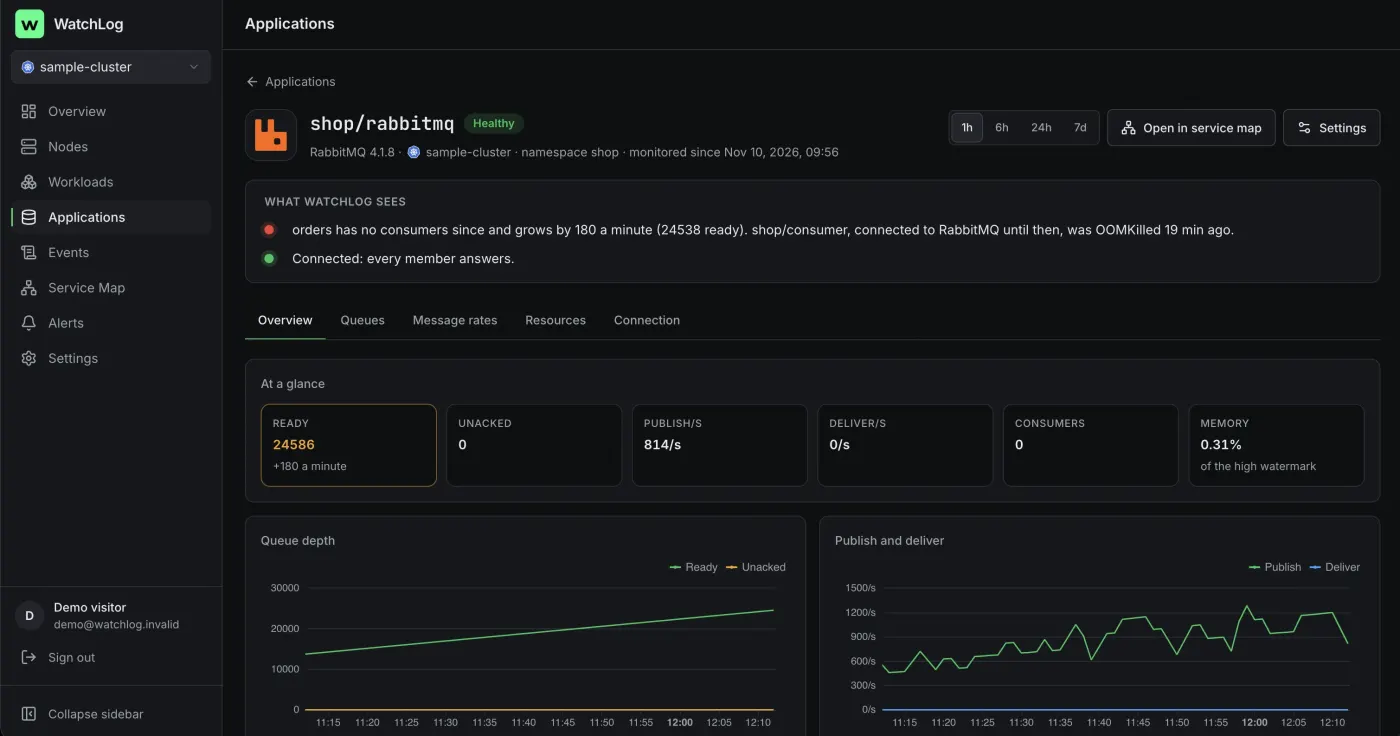
Everything on one page, in four tabs
- OverviewReady and unacked messages, publish and deliver rates, consumers, memory against the high watermark, and the queues.
- QueuesDepth and consumers by queue, and the ready messages of the deepest queues.
- Message ratesPublish, deliver, redeliver and ack per second, publisher confirms, unroutable and dead-lettered messages.
- ResourcesEach node's memory, file descriptors and Erlang processes, and free disk against the alarm limit.
Problems it explains
- A queue that grows with no consumers, and the consumer that was probably lost: OOM-killed, crash-looping, exited or gone
- A queue that grows although it has consumers
- A memory or disk alarm (publishers are blocked)
- More than 10,000 unacked messages
- Messages being dead-lettered
- The prometheus plugin off on a node, with its command
RabbitMQ's metrics don't say which client consumed which queue, so the lost consumer is the likeliest one, not a certainty.
Alerts on from day one
- A queue grows with no consumers for 5 minutes
- A memory or disk alarm
- More than 10,000 unacked messages for 5 minutes
- A node down for a minute
- Messages dead-lettered for 5 minutes
To Slack, Telegram, email or a webhook. You choose which start on when you connect, and change any of them in the rule editor.
Nothing to set up
WatchLog reads the rabbitmq_prometheus plugin, which ships with RabbitMQ and is on in the official images, on port 15692 of every node. No user, no password, and it never reads messages. If the plugin is off, the page gives the command for each node; no restart is needed:
Every option in the docs →kubectl exec -n shop rabbitmq-0 -- rabbitmq-plugins enable rabbitmq_prometheus
docker exec shop-rabbitmq-1 rabbitmq-plugins enable rabbitmq_prometheus
Docker hosts also run the integrations collector: the service page gives its docker run command. On Kubernetes the chart already runs it.
Ask your AI about RabbitMQ
Claude and ChatGPT read the same facts through WatchLog's MCP server, read-only: the service's health, every reason, and the workloads or containers that connect to it.
Connect your assistant →Why aren't orders being processed?
get_application · get_events
Queue orders.created has had no consumer for 6 minutes and holds 1,000 ready messages. The likely lost consumer is shop-billing-worker-1: it was OOM-killed at its memory limit.
 Redis
 PostgreSQL
 Nginx