See everything in your Kubernetes cluster in 5 minutes.
Open-source monitoring with one agent. Nodes, pods, containers and the network between your services. No PromQL, no dashboards to build. Docker hosts work too.
# Kubernetes · server and agents in namespace watchlog
kubectl create namespace watchlog
kubectl label namespace watchlog \
  pod-security.kubernetes.io/enforce=privileged
helm install watchlog \
  oci://ghcr.io/watchlog-light/charts/watchlog \
  -n watchlog --version 0.1.1
# Docker host · server, with a password and key in .env
curl -fsSLO https://watchlog.io/compose.yaml
printf 'WATCHLOG_DB_PASSWORD=%s\nWATCHLOG_SECRET_KEY=%s\n' \
  "$(openssl rand -hex 16)" "$(openssl rand -base64 32)" > .env
docker compose up -d
# then copy the agent command from Settings → Clusters
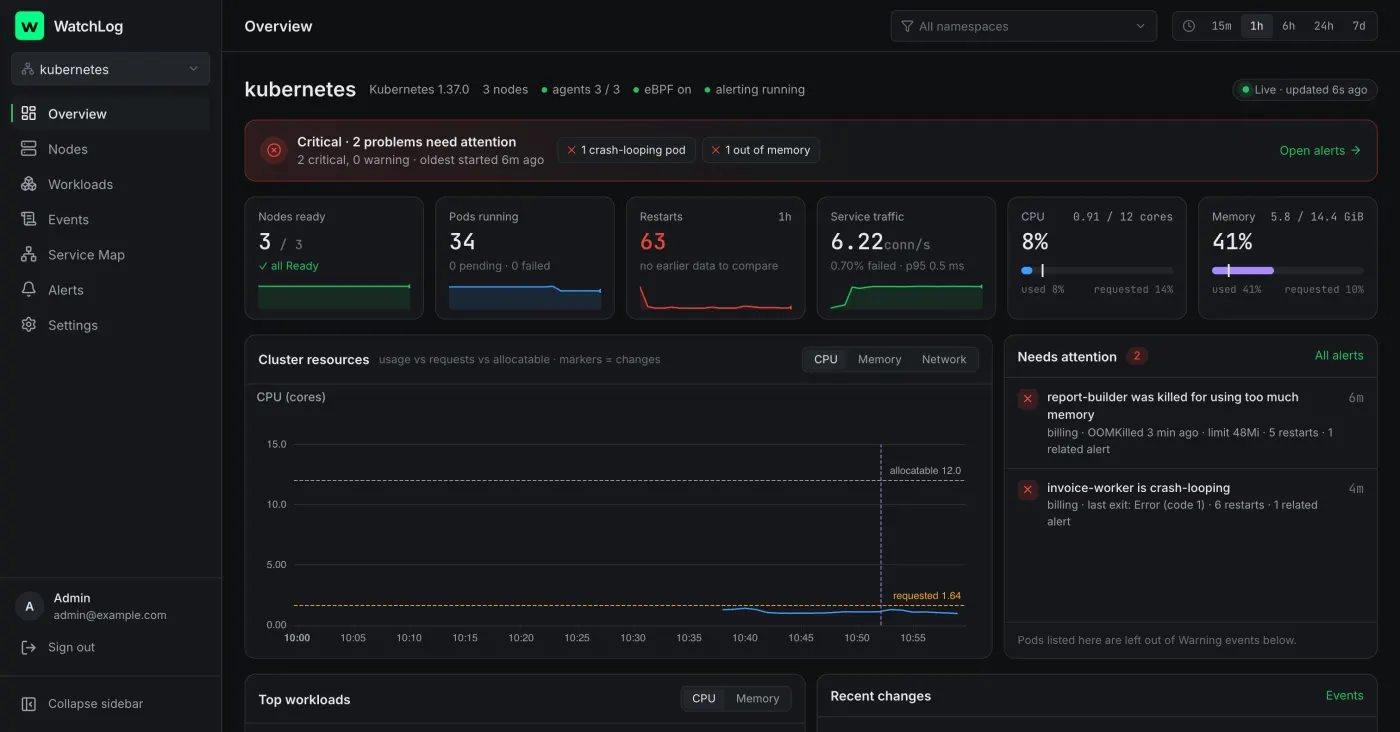
- Open source (AGPL-3.0)
- Read-only agent, two capabilities
- Self-host in one command
- Built with eBPF
- ~20 MB per node
The answers you need, without assembling a stack.
Which pod is restarting? Which node is out of memory? Why can service A not reach service B? WatchLog answers these on day one.
One-command install
A Helm chart or one docker run. No exporters, no PromQL, no dashboards to wire up.
first metrics 21 s after install (measured)Service map from real traffic
eBPF sees every TCP connection: who talks to whom, failures and latency. No sidecars, no code changes.
0.16 % of a core per node under loadAlerts that work on day one
CrashLoopBackOff, OOMKilled, node pressure, disk full and more, enabled by default. To Slack, Telegram, email or webhook.
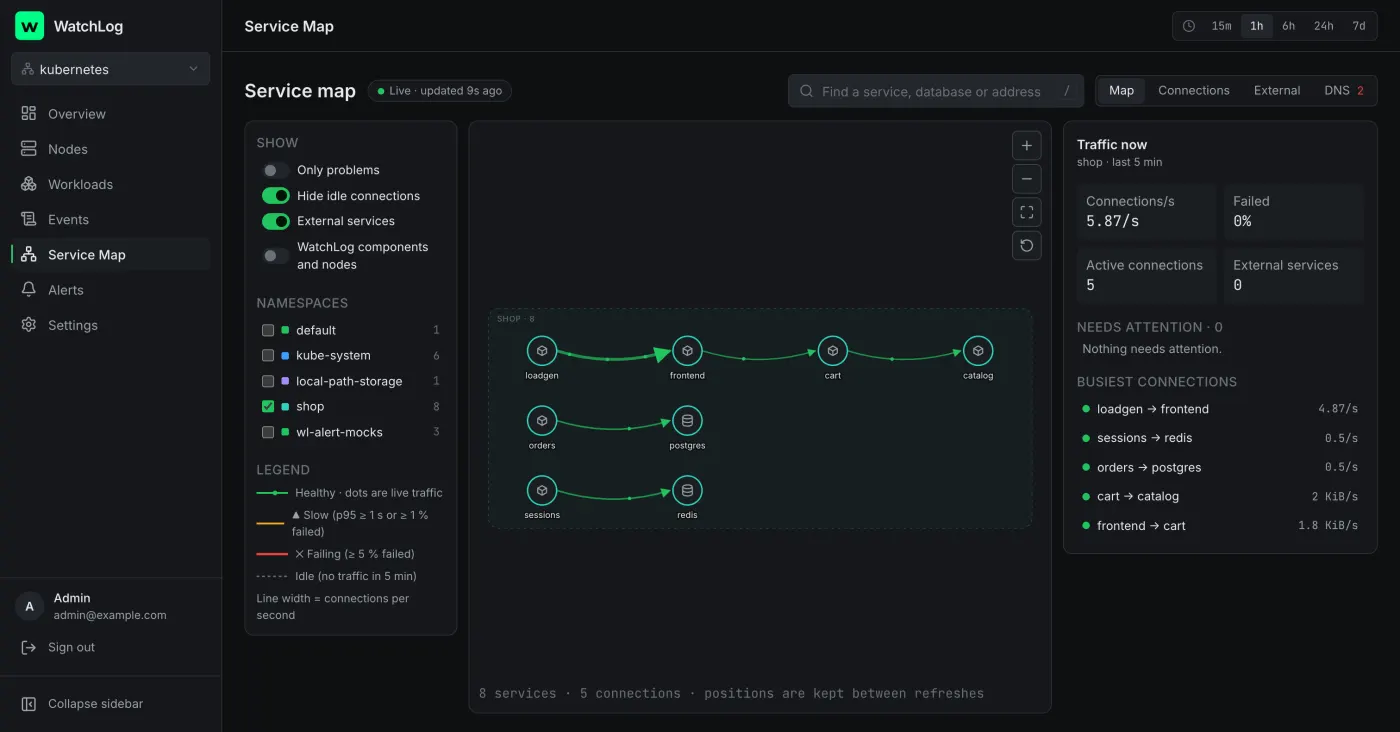
15 default rulesSee who talks to whom, live.
Every connection between your workloads, with connections per second, failed connections and connect latency. Failing edges light up with the reason.
- Grouped by namespace, with external dependencies by DNS name
- Click any edge for its history and the related alert
- Falls back to topology when eBPF isn't available
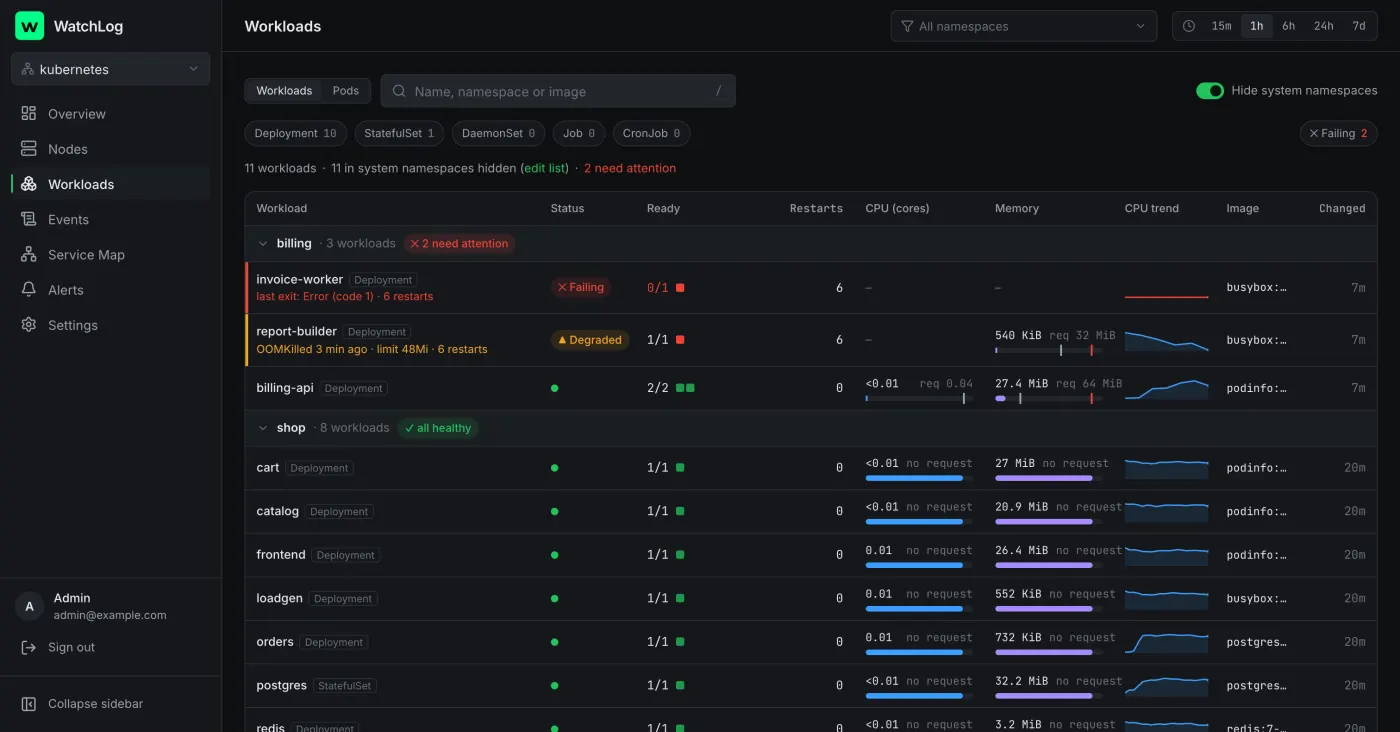
Restart reasons, not just restart counts.
Every workload grouped by namespace, with usage against requests and limits, and the reason a pod is failing in plain words.
- OOMKilled, exit codes and crash loops explained
- Usage bars with request and limit markers
- Change markers for every rollout on every chart
Why not just Prometheus + Grafana?
It's a great stack if you have the time to build and own it. WatchLog is for teams who'd rather not.
| Prometheus + Grafana (DIY) | WatchLog | |
|---|---|---|
| Setup | Hours: exporters, scrape configs, dashboards | One command, ~5 minutes |
| Maintenance | Dashboards and rules you own forever | Opinionated views, upgraded with the chart |
| Service map | Needs a service mesh or tracing | From eBPF, no code changes |
| Default alerts | Write and tune them yourself | 15 rules on install |
| Query language | PromQL | None needed |
| Flexibility | Unlimited, any metric, any dashboard | Fixed views (custom dashboards aren't a goal) |
Install, see data, get alerted.
- 01
Install the agent
A DaemonSet reads cgroups, the kubelet and eBPF on each node. One cluster-agent watches the Kubernetes API, read-only.
- 02
Data arrives
Agents push over HTTPS to your WatchLog server: VictoriaMetrics for metrics, PostgreSQL for everything else. Nothing connects into your cluster.
- 03
Get alerted
Default rules fire on real problems with a plain-language reason, a chart and a link. Grouped, so one broken cluster is one message.
What the agent can and can't see.
It's open source, so you don't have to take our word for it. Every permission is documented with the reason it's needed.
Can
- Read node, pod and container resource usage
- Watch Kubernetes objects and events (read-only)
- See TCP connection metadata and DNS names via eBPF
- Use only the BPF and PERFMON capabilities
Can't
- Read Secrets, ConfigMaps or environment variables
- Read request payloads or decrypt TLS
- Execute commands or change anything in your cluster
- Accept inbound connections from outside
Free and open source. Self-host it in one command.
WatchLog Community is complete for one cluster: monitoring, the service map and alerting are never paywalled. If it saves you time, a GitHub star helps more people find it.
- license
- AGPL-3.0
- RAM for the whole stack, 3-node test cluster
- ~450 MB
- agent memory per node
- ~20 MB
- images, signed at release
- amd64 · arm64
Self-host today. Cloud is coming.
Community available now
- One cluster or Docker fleet, unlimited nodes
- Service map, alerts, all dashboards
- Your servers, your data
WatchLog Cloud coming soon
- Nothing to host or upgrade
- Multiple clusters, 30-day history
- Anomaly detection that learns your cluster
One email when Cloud opens; nothing else. See the privacy policy.
Questions
Is it really free?
Yes. WatchLog Community is AGPL-3.0 and complete for one cluster. Paid plans will add hosting, more clusters, longer history and organisation features. Nothing that is free today will become paid.
What data leaves my cluster?
When you self-host, nothing leaves your infrastructure: agents send metrics, Kubernetes object summaries and events to your own WatchLog server. Secrets, environment variables and payloads are never read, and the software sends nothing to us.
Which kernels support the service map?
Linux 5.8 or newer with BTF, which covers current Ubuntu, Debian, RHEL and managed Kubernetes images. On older kernels everything else works and the map shows topology only.
How is it different from Coroot or Netdata?
Coroot is the closest: an eBPF service map plus tracing, logs, profiling and SLOs, free under Apache-2.0. Netdata collects far more metrics, every second, across hundreds of integrations. WatchLog is narrower on purpose: fixed Kubernetes and Docker views, a service map and alerts that work on day one, with a lighter node agent. If you need tracing or per-second metrics, they are the better choice.
Can I run it in an air-gapped network?
Community runs fully self-hosted: mirror the images and the chart into your own registry. A documented air-gapped install with an offline licence is planned for the Enterprise edition.
Which alert channels are supported?
Slack, Telegram, email (your SMTP server) and signed webhooks today; Teams, Discord, PagerDuty and Opsgenie are planned.